How to Write an Invoice: A Step-by-Step Guide (2026)
Most invoices are an afterthought scribbled at the end of a project. Treat them as the last — and most important — deliverable, and you get paid faster.
A designer I know spent three weeks chasing a £4,200 payment. The invoice was eventually found buried in a project email thread, sent as a Word document, addressed to the wrong contact, with no due date. The client wasn't malicious — they genuinely hadn't processed it. Three weeks of follow-up, an awkward relationship, and a cash-flow hole that nearly cost her a subcontractor. All of it preventable.
The core structure of an invoice barely changes across industries or countries. Once you know the handful of fields that matter, you can write one for any client in a few minutes. This guide breaks down each part, shows you what to include, and flags the mistakes that cost real money.
What Your Invoice Actually Has to Do
Your invoice is the document that triggers payment. Get it wrong and you wait. Get it right and money moves.
A clear, complete invoice does three things: it tells the client exactly what they owe, it gives them everything they need to process payment internally, and it creates a legal record you can rely on if anything goes sideways. Sloppy invoices — missing PO numbers, vague descriptions, no due date — are the single biggest cause of preventable late payments.
It's also worth knowing the difference between an invoice and a bill before you start: same document, different perspective. You send an "invoice"; your client receives a "bill." The content is identical.
Anatomy of a Professional Invoice
Every invoice has the same core parts. Here they are, top to bottom:
- 1. Your Details Legal business name, address, email, phone. If you operate as a sole trader, use your full name.
- 2. Client Details Company name, billing contact, address. Match the name to the contract or PO.
- 3. Invoice Number Unique, sequential (INV-2026-001). Never reuse. Gaps raise audit flags.
- 4. Dates Issue date + due date. Always both. "Net 30" is useless without a concrete date.
- 5. Line Items Description, quantity, rate, total. Be specific: "Brand audit — 12 hrs @ $120/hr" not "Services."
- 6. Totals Subtotal, tax (labelled with rate), grand total. Separate them clearly.
- 7. Payment Instructions Bank details, PayPal, Stripe link — at least two methods. Don't make them ask.
- 8. Tax ID VAT number (UK), ABN (AU), EIN (US), BN (CA). Required for certain invoice types and jurisdictions (e.g. VAT/GST invoices).
The sample invoice below shows all of these in action. You can create one like it in seconds with our free invoice generator.
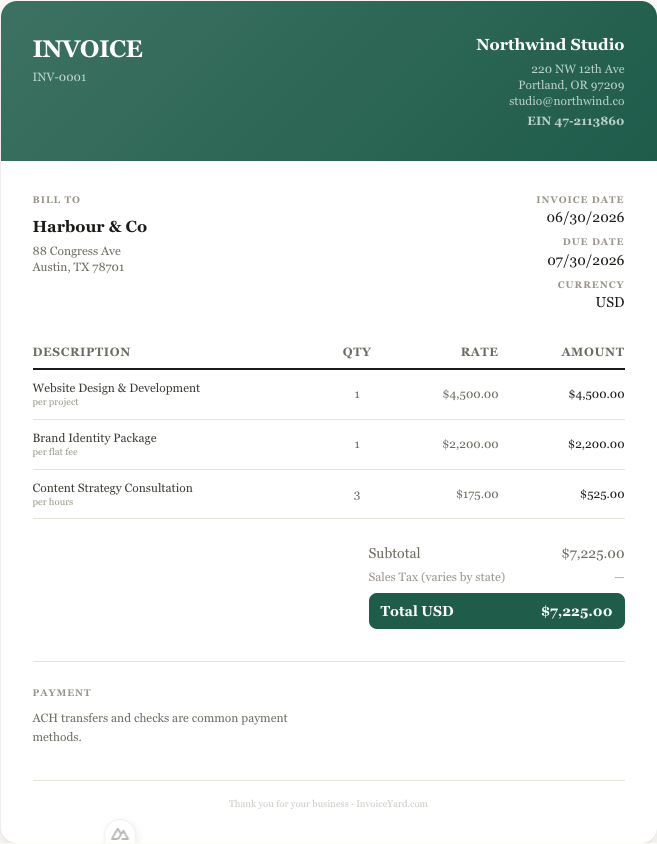
A complete invoice built in InvoiceYard's free generator — every field in its place.
Sequential numbering is a legal requirement in many jurisdictions and best practice everywhere. It simplifies audits and helps both you and your clients track payments, so establish your scheme from invoice one.
Setting Up Your Header
Start with your identity at the top. Logo is optional but professional. Legal business name, address, and contact info are mandatory.
Place the word "INVOICE" prominently. In Australia, tax invoices for taxable sales should be clearly identified as "Tax Invoice". Below the title, add three things side by side: invoice number, issue date, due date. No ambiguity.
Client Details: Get the Name Right
Below your header, add the client's company name, contact person, and billing address. If they gave you a purchase order (PO) number, reference it here — many corporate AP departments will reject invoices without a matching PO.
Double-check the company name. "Acme Inc." and "Acme Incorporated" might look the same to you, but they can fail automated matching in large AP systems. Use exactly what appears on the contract.
Writing Line Items That Actually Get Paid
This is where most invoices fail. Vague descriptions trigger questions, and every question pushes your payment further out — often by a week or more.
Good line item: "Homepage redesign — wireframes, visual design, 2 revision rounds — $4,200"
Bad line item: "Design services — $4,200"
Each line should include: a clear description of the deliverable, quantity or hours, the agreed rate, and the line total. If the project uses milestones, reference which milestone this covers so the client can match it to the scope document.
Calculating Tax Correctly
Below your line items, show: subtotal, tax, and grand total — each on its own line.
Label the tax clearly. "VAT (20%): £240.00" or "Sales Tax (8.875%): $71.00". If you are not registered for VAT/GST, state it: "No VAT charged — below registration threshold." Leaving it blank makes the client wonder if you forgot.
Tax rules vary wildly by country. UK freelancers register for VAT at £90,000 turnover; Australian freelancers register for GST at $75,000 AUD. US freelancers generally don't charge sales tax on services, but it depends on the state. Our guides on UK VAT invoices and US sales tax go deeper on the specifics.
In most countries, sole traders, freelancers, and individuals can invoice for work performed without a business licence — you may only need to register for tax (VAT, GST) once revenue exceeds your country's threshold.
Payment Terms and Methods
State your terms clearly: "Net 30" means the full amount is due within 30 calendar days of the invoice date. But also write the actual due date. Not everyone knows what "Net 30" means, and you don't want to leave it to interpretation.
Include at least two payment methods. Bank transfer details are standard, but adding a Stripe or PayPal link removes friction, and a frictionless invoice tends to get paid faster than one that sends the client off to set up a manual transfer.
For early payment discounts or more complex term structures, see our payment terms guide.
Notes, References, and Late-Fee Clauses
The notes section is for anything that doesn't fit above: project references, a brief thank-you, your refund policy, or a late payment clause.
A typical late-fee clause: "A late fee of 1.5% per month will apply to balances overdue by more than 14 days." You may never actually charge it, but having it on paper changes client behaviour. Check your local regulations — some jurisdictions cap the interest rate you can charge on overdue commercial debts.
Mistakes That Actually Cost You Money
These are not theoretical. Each one causes real delays:
- Missing invoice numbers — AP systems cannot track the payment. You end up in a "we never received it" loop.
- Wrong client name — automated matching fails. Especially costly with government and enterprise clients.
- "Services rendered" — forces the client to ask what they are paying for, and every clarifying email pushes your payment further out.
- No payment instructions — surprisingly common. The client literally doesn't know how to pay you.
- Sending as a Word doc — editable, unprofessional, and some email clients mangle the formatting. Always PDF.
- Forgetting tax when you should charge it — you owe the tax authority regardless. Now it comes out of your profit.
Most of these disappear when you use a template with the right fields already built in. Try our free invoice templates for freelancers, or jump straight to the invoice generator.
Keep reading
Can You Change an Invoice After Sending It? How to Correct Invoice Mistakes
Once an invoice is sent you shouldn't silently edit it. Here's how to void, reissue, or use a credit note to fix wrong amounts, clients, or tax.
8 min readDocument TypesWhat Is a Debit Note? Debit Note vs Credit Note Explained (+ Free Template)
A plain-English guide to debit notes: who issues them, when a buyer or supplier uses one, how they differ from credit notes and invoices, plus a free template.
8 min read